Filter for masked arrays
numbamisc includes several filter (convolution) functions:
sum_filteraverage_filter
as well as the following rank filters:
median_filtermedian_filter_weightedmin_filtermax_filter
The main difference to the ones in other libraries is that these handle masked arrays. However this imposes some restrictions as well:
- The kernel for
sum_filterandaverage_filtermust not contain mixed positive and negative values. - The functions are slower because they cannot exploit common filter optimizations.
Note
The filters have an artificial limit of 5 dimensions. If you need higher
dimensional support you can alter the numbamisc/_filters.py file.
There should be a line fobj.write(generate(maxndim=5)), the
maxndim value restricts the maximum dimension of the functions.
Masks
Each filter function accepts a mask argument. But for some data types it
is not necessary to specify it explicitly. For example if the data argument
is a
numpy.ma.MaskedArrayastropy.nddata.NDData
object then it’s mask will be used by default!
It’s possible to override this by explicitly passing in a mask.
Kernels
The kernel is an array of weights that is applied to each local neighborhood to calculate the resulting filtered value. The kernel has different interpretations depending on the kind of filter.
- For
sum_filterandaverage_filterit represents an array of weights. - For
median_filter,min_filterandmax_filterit represents a boolean condition if the values should be taken into account. - For
median_filter_weightedit represents integer weights.
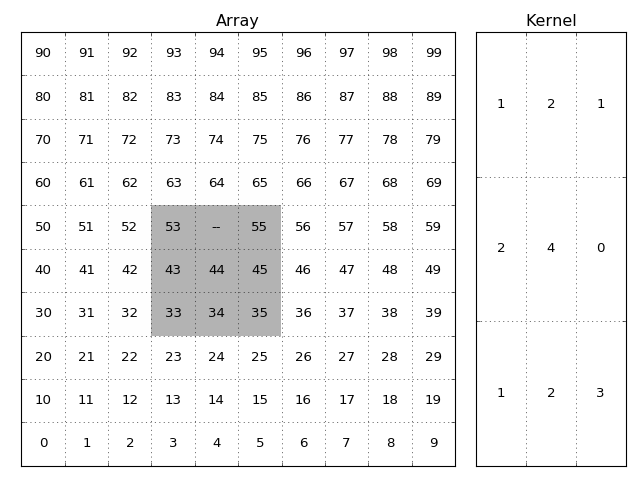
The image and kernel. The grey shadowed part of the array are the elements
used when calculating the result of the (x=5, y=4) item. The --
represents a masked value.
The value of the output element will be:
1*53 + 0(2*'--') + 1*55 + 2*43 + 4*44 + 0*45 + 1*33 + 2*34 + 3*35
divided by the sum of the valid kernel elements:
1+0+1+2+4+0+1+2+3
and in case of sum_filter thereafter multiplied by the total sum of
kernel elements.
1+2+1+2+4+0+1+2+3
To ease using the kernel there are some shortcuts if the kernel is simple, if
the kernel argument is an:
int, then it’s assumed that this integer gives the shape in all dimensions and the kernel should contain ones. For example when the data has 3 dimensions andkernel=4is used then internally the kernel will be converted tonp.ones((4, 4, 4)).tuple, then this will be used asshapeargument for a kernel containing ones:np.ones(kernel).astropy.convolution.Kernel, then it’s array attribute is used.
Otherwise an explicit numpy.array object is expected.
Border handling
These filters accept the following border arguments:
ignore(default)reflectmirrornearestwrap
Except for ignore (which ignores values outside the array) these are used
to specify how the array is padded if the kernel goes outside the array
grid.
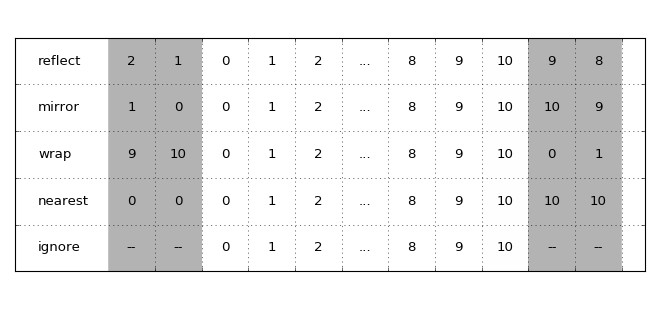
How the options affect how the array is padded. The grey areas indicate the padded values.
NaN handling
Each filter has the option to also treat NaN values as masked. Just pass
ignore_nan=True to the filter function.